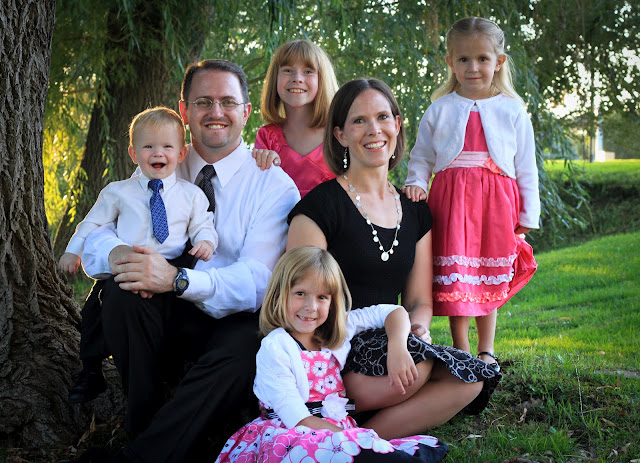
Every picture I take in my house ends up with a yellowish tint, like this:
 Here's a quick fix (using Photoshop CS2):
Click Image, adjustments, photo filter, use the drop down menu to select one of the cooling filters. You can play around with some of the other filters for a cool effect too.
Doesn't that look better?
 Most of my pictures end up underexposed. I have two favorite tricks to fix that.
Trick #1
With your photo layer active, click image, adjustment, shadow/highlight. I use the slider to adjust the shadow by 20-30%, then click okay. Here's the result.

Trick #2
Duplicate the photo by right clicking the photo layer in your layer pallet. Click on the new duplicate layer, then click the drop down menu for the blending modes (this is at the top left of your layers palette). Select "screen". You can then adjust the brightness of the duplicated layer by adjusting the opacity slider (at the top right of your layers palette). After this step I usually flatten the image by right clicking either layer in the layers palette and selecting "flatten image". Here's the result.
 Sometimes if I want so soften the colors in a picture, I'll do the following:
Duplicate the photo by right clicking the photo layer in your layer pallet and clicking duplicate. Next you want to desaturate this photo, which can be done several ways, but this is my favorite: click image, adjustments, channel layer. Click the little box that says monochrome. You can adjust the brightness of the black & white image by adjusting the bottom slider labeled "constant."Click okay. Back in your layers palette (at the top right), adjust the opacity of the black and white layer to let some of the colored layer show through. Sometimes I flatten the image after this step, sometimes I don't. Here's the new result.

 Sometimes if I want so soften the colors in a picture, I'll do the following:
Duplicate the photo by right clicking the photo layer in your layer pallet and clicking duplicate. Next you want to desaturate this photo, which can be done several ways, but this is my favorite: click image, adjustments, channel layer. Click the little box that says monochrome. You can adjust the brightness of the black & white image by adjusting the bottom slider labeled "constant."Click okay. Back in your layers palette (at the top right), adjust the opacity of the black and white layer to let some of the colored layer show through. Sometimes I flatten the image after this step, sometimes I don't. Here's the new result.


